Wednesday, June 22, 2016

FuncComparer

Often we need a means to compare collections of complex structures. Consider


public class Contact
{
    public Guid Id { get; private set; }
    public string Name { get; set; }
    public Contact() { Id = Guid.NewGuid(); }
}

[TestMethod]
public void Test()
{
    Contact[] expected = new[] 
    {
        new Contact { Name = "Bob", },
        new Contact { Name = "Abel", },
    };
    Contact[] actual = new[] 
    {
        new Contact { Name = "Abel", }, 
        new Contact { Name = "Charlie", },
    };
    // TODO: test for equivalence?
}


I often run into situations like these when testing functions on collections, as presented above. I also see similar situations when comparing collections from a client (that may have modified or net-new entities) to collections from a datastore.


There are many ways to resolve these sorts of scenarios, like in-lining comparison logic, overriding Equals method, or even declaring a custom equivalence class that implements IEqualityComparer<Contact>. The first method is brittle and completely not portable. Overriding Equals is a little more portable, but still fairly brittle - for instance, if in one context I require equality based on Name, in another context equality of Id, and yet another based on both. The third method is portable and is externalized from the class so that it may be clearly swapped depending on context (consider ContactNameEqualityComparer versus ContactIdEqualityComparer).


My only gripe with this last method is that it is always so tedious to implement the boiler-plate comparisons in every instance of a comparer (for instance, writing trivial accept and reject criteria for ContactNameEqualityComparer, and then re-writing that criteria again for ContactIdEqualityComparer, and then again for any other comparers that exist in our system for other types).


FuncComparer


Really I want something that encapsulates basic comparison functionality while being able to supply comparison criteria as lambdas.


public class FuncComparer<T> : IComparer, IComparer<T>
{

    private readonly Comparison<T>[] comparisons = null;
    private readonly int xIsNotNullComparison = 0;
    private readonly int yIsNotNullComparison = 0;

    public FuncComparer(
        Comparison<T> comparison, 
        bool isNullLessThan = true) :
        this (new[] { comparison, }, isNullLessThan)
    {
    }

    public FuncComparer(
        Comparison<T>[] comparisons, 
        bool isNullLessThan = true)
    {
        this.comparisons = comparisons;
        this.xIsNotNullComparison = isNullLessThan ? 1 : -1;
        this.yIsNotNullComparison = isNullLessThan ? -1 : 1;
    }

    // interfaces

    #region IComparer Members

    public int Compare(object x, object y)
    {
        int comparison = 0;
        if (!ReferenceEquals(x, y))
        {
            bool xIsNull = true;
            bool yIsNull = true;
            T a = default(T);
            T b = default(T);
            if (x is T)
            {
                xIsNull = false;
                a = (T)(x);
            }
            if (y is T)
            {
                yIsNull = false;
                b = (T)(y);
            }
            comparison = Compare(a, xIsNull, b, yIsNull);
        }
        return comparison;
    }

    #endregion

    #region IComparer<T> Members

    public int Compare(T x, T y)
    {
        int comparison = 0;
        if (!ReferenceEquals(x, y))
        {
            comparison = Compare(x, x == null, y, y == null);
        }
        return comparison;
    }

    #endregion

    // private methods

    /// <summary>
    /// Compare two strong-typed values. Explicit 'is null' 
    /// parameters are required for scenarios where 
    /// <typeparamref name="T"/> is a valuetype and type-less 
    /// compare is used. In such cases, type-less method uses 
    /// default-type value which will telescope nulls to default
    /// values. For example, when comparing a series of integers,
    /// any nulls in our inputs will be interpreted as '0'.
    /// </summary>
    /// <param name="x"></param>
    /// <param name="isXNull"></param>
    /// <param name="y"></param>
    /// <param name="isYNull"></param>
    /// <returns></returns>
    private int Compare(T x, bool isXNull, T y, bool isYNull)
    {
        int comparison = 0;
        if (!isXNull && !isYNull)
        {
            for (
                int i = 0; 
                i < comparisons.Length && comparison == 0; 
                i++)
            {
                comparison = comparisons[i](x, y);
            }
        }
        else if (!isXNull)
        {
            comparison = xIsNotNullComparison;
        }
        else if (!isYNull)
        {
            comparison = yIsNotNullComparison;
        }
        // both x and y are null, implies equality, no-op
        //else
        //{
        //}
        return comparison;
    }

}

What we may now do is
public class Contact
{
    public Guid Id { get; private set; }
    public string Name { get; set; }
    public Contact() { Id = Guid.NewGuid(); }
}

[TestMethod]
public void Test()
{
    FuncComparer<Contact> contactNameComparer = 
        new FuncComparer<Contact>(
            (a,b) => string.Compare(
                a.Name,
                b.Name,
                StringComparison.InvariantCultureIgnoreCase));
    Contact[] expected = new[] 
    {
        new Contact { Name = "Bob", },
        new Contact { Name = "Abel", },
    };
    Contact[] actual = new[] 
    {
        new Contact { Name = "Abel", }, 
        new Contact { Name = "Charlie", },
    };
    // NOTE: successfully demonstrates ease-of-use, esp
    // when tests are repeated with minor variances in
    // expectation
    CollectionAssert.AreNotEqual(
        expected, 
        actual, 
        contactNameComparer);
    CollectionAssert.AreEqual(
        new[] 
        {
            new Contact { Name = "Abel", },
            new Contact { Name = "Charlie", },
        },
        actual,
        contactNameComparer);
}


Why 'isXNull' and 'isYNull'?


The oddest thing about FuncComparer is how it handles null checks. We perform null checks on the way in, before the private core-implementation executes. This is because the private core-implementation is strongly typed, co-ercing any null inputs into base-type defaults. For reference types, such as any class, this is ok, since default(T) is still null. However, for valuetypes like int or struct, we end up telescoping nulls into default values, which is a loss-full transformation, a reduction in fidelity.


We overcome this through explicit null tests on the way in, and pass that on as state to our core-implementation.


[TestMethod]
public void Test()
{
    IComparer typelessComparer = 
        new FuncComparer<int>(
            (a,b) => a.CompareTo(b),
            true);
    // we expect 'null is less-than', so x as null should
    // return less-than
    int expectedComparison = -1;
    int actualComparison = 
        typelessComparer.Compare(null, 0);
    Assert.AreEqual(expectedComparison, actualComparison);
}

One last minor detail, is the ability to configure an ordinal interpretation of null in relation to all other values. Our constructor accepts a boolean that indicates any null values should be considered less-than non-null values, or vice versa. This allows us to tweak things like list ordering.
[TestMethod]
public void Test()
{
    IComparer typelessComparer = 
        new FuncComparer<int>(
            (a,b) => a.CompareTo(b),
            false);
    object[] expected = new object[] { 0, 1, 2, 3, 4, null, };
    ArrayList actual = new ArrayList { 1, null, 4, 2, 3, 0, };
    actual.Sort(typelessComparer);
    CollectionAssert.AreEqual(expected, actual);
}

FuncEqualityComparer

Upon implementing a FuncComparer, the very next thing that I do is implement a FuncEqualityComparer; so it follows that I should post this next. An implementation of IEqualityComparer on top of an IComparer is relatively trivial and straightforward,


public class FuncEqualityComparer<T> : 
    FuncComparer<T>, 
    IEqualityComparer, 
    IEqualityComparer<T>
{

    private readonly Func<T, int> getHashCode = null;

    public FuncEqualityComparer(
        Comparison<T> comparison, 
        Func<T, int> getHashCode, 
        bool isNullLessThan = true) :
        this(new[] { comparison, }, getHashCode, isNullLessThan)
    {
    }

    public FuncEqualityComparer(
        Comparison<T>[] comparisons, 
        Func<T, int> getHashCode, 
        bool isNullLessThan = true) :
        base(comparisons, isNullLessThan)
    {
        this.getHashCode = getHashCode;
    }

    // interfaces

    #region IEqualityComparer Members

    public new bool Equals(object x, object y)
    {
        int comparison = Compare(x, y);
        bool isEqual = comparison == 0;
        return isEqual;
    }

    public int GetHashCode(object obj)
    {
        int hashCode = 0;
        T o = default(T);
        if (obj is T)
        {
            o = (T)(obj);
        }
        hashCode = getHashCode(o);
        return hashCode;
    }

    #endregion

    #region IEqualityComparer<T> Members

    public bool Equals(T x, T y)
    {
        int comparison = Compare(x, y);
        bool isEqual = comparison == 0;
        return isEqual;
    }

    public int GetHashCode(T obj)
    {
        int hashCode = getHashCode(obj);
        return hashCode;
    }

    #endregion

}


No real secret sauce here; merely account for GetHashCode and interpret an underlying comparison.

Thursday, January 3, 2013

Continuous Integration, how do I declare commonly derived MSBuild metadata?

So, following some recent posts on MSBuild-NUnit integration, I went back and reviewed some of the implementation and wondered if there were easier ways to reference commonly derived metadata.

The motivation for this post stems from issues I encountered with long paths and paths that contain spaces; eg "C:\Users\johnny g\Documents\Visual Studio 2012\Projects\UnitTests\Example.Continuous\..\Example.UnitTests\bin\debug". Both present particular logistic problems when commands require multiple paths as inputs.

So, what follows are a number of refinements I picked up in my exploration to address some of these issues.

Custom ItemGroup versus ProjectReference


In previous examples, I prescribed custom ItemGroups, like TestAssembly below

<ItemGroup>
  <TestAssembly Include="Example.UnitTests.dll">
    <WorkingDirectory>
      $(MSBuildProjectDirectory)\..\Example.UnitTests\$(OutputPath)
    </WorkingDirectory>
  </TestAssembly>
</ItemGroup>

I prefered this since it would not collide nor compromise any other build metadata. However, it does produce some visual artifacts in Visual Studio, and requires a manual edit of the project file to modify.

Figure 1, custom TestAssembly item appears as missing dll.

A better solution, which would resolve these issues and facilitate adding test projects, is to leverage the well-known ItemGroup ProjectReference.

Adding ProjectReference Items is as simple as using "Add Reference" feature from Visual Studio. However, to add custom metadata for these Items will require a little finesse, but that is what follows below!

Extending ItemGroup metadata


MSBuild permits the extension of existing metadata through the use of ItemDefinitionGroups. This will work for custom Items, such as TestAssembly, or well-known Items, like ProjectReference.

When we add a project reference via Visual Studio, we end up with a ProjectReference Item

<ItemGroup>
  <ProjectReference Include="..\Example.UnitTests\Example.UnitTests.csproj">
    <Project>{eaac5f22-bfb8-4df7-a711-126907831a0f}</Project>
    <Name>Example.UnitTests</Name>
  </ProjectReference>
</ItemGroup>

To add custom metadata, we simply define an ItemDefinitionGroup.

For example, let's define both a WorkingDirectory, and an OutputFile for our test libraries,

<ItemDefinitionGroup>
  <ProjectReference>
    <WorkingDirectory>%(RootDir)%(Directory)$(OutputPath)</WorkingDirectory>
    <OutputFile>%(Filename).dll</OutputFile>
  </ProjectReference>
</ItemDefinitionGroup>

Essentially, for each ProjectReference Item, MSBuild will add custom metadata WorkingDirectory, composed of well-known per-Item metadata RootDir, Directory, and project defined OutputPath. Similarly, OutputFile is a simple concatenation of per-Item metadata Filename and literal ".dll".

For a full list of well-known Item metadata, take a peek at this MSDN reference page.

From relative to absolute paths


When a project exists in a sibling directory we will often end up with relative paths which, when squeezing the most out of a command line, chews up valuable character space. We can mitigate this by converting unevaluated relative paths to absolute paths.

MSBuild exposes a task for path conversion (ConvertToAbsolutePathTask), but we may also inline static method calls; eg $([System.IO.Path]::GetFullPath(C:\Temp\..\Some.Other.Path)). For our purposes, we'll use the latter since we have only a handful of paths to define and the syntax is easy enough to manage.

Really, we only require a WorkingDirectory, a resources folder, and an artifact folder. We have already defined an absolute path WorkingDirectory in our ItemDefinitionGroup, so that leaves resources and artifacts.

Since our tools and output folders are not likely to vary from Item to Item, let's define some project properties to capture these paths.

<PropertyGroup>
  <TestResultsFolder>
    $([System.IO.Path]::GetFullPath($(MSBuildProjectDirectory)\..\TestResults\))
  </TestResultsFolder>
  <ResourcesFolder>
    $([System.IO.Path]::GetFullPath($(MSBuildProjectDirectory)\..\Resources\))
  </ResourcesFolder>
</PropertyGroup>

For example, these will evaluate from "C:\Projects\Example.Continuous\..\Resources\" to "C:\Projects\Resources\". With these root definitions defined, we can then define other properties and metadata like

  <PropertyGroup>
    <NUnitExe>$(ResourcesFolder)NUnit-2.6.0.12051\nunit-console.exe</NUnitExe>
    <NUnitExe-x86>$(ResourcesFolder)NUnit-2.6.0.12051\nunit-console-x86.exe</NUnitExe-x86>
    <NUnitTestResultsFolder>$(TestResultsFolder)NUnit\</NUnitTestResultsFolder>
  </PropertyGroup>

  <ItemDefinitionGroup>
    <ProjectReference>
      <NUnitTestResultsFile>$(NUnitTestResultsFolder)%(OutputFile).xml</NUnitTestResultsFile>
    </ProjectReference>
  </ItemDefinitionGroup>

Escaping paths with spaces


As cited earlier, paths with spaces in them may present particular problems depending on the form of our Exec task. For instance, consider

paths
  • $(NUnitExe), C:\Users\johnny g\Documents\Visual Studio 2012\Projects\UnitTests\Resources\nunit-console.exe
  • %(ProjectReference.OutputFile), Example.UnitTests.dll
  • %(ProjectReference.NUnitTestResultsFile), C:\Users\johnny g\Documents\Visual Studio 2012\Projects\UnitTests\TestResults\NUnit\Example.UnitTests.dll.xml
  • %(ProjectReference.WorkingDirectory), "C:\Users\johnny g\Documents\Visual Studio 2012\Projects\UnitTests\Example.UnitTests\bin\debug"
 and Exec task

<Exec
  Command="$(NUnitExe) %(ProjectReference.OutputFile) /nologo
    /result=%(ProjectReference.NUnitTestResultsFile)"
  WorkingDirectory="%(ProjectReference.WorkingDirectory)" />

this task will fail for two similar reasons. First, WorkingDirectory is escaped with quotation marks; this poses problems for Exec task's WorkingDirectory parameter, which expects a simple unenclosed path. Second, nunit-console.exe will fail because its result specification is not escaped with quotation marks; it will misinterpret any path spaces as new parameter specifications and blow up.

Since paths may be used in any number of ways during build (for instance arbitrary path concatenation, or various embedded parameters, or contexts that require or prohibit quotations marks), I have settled on simply defining raw paths in my properties and metadata, and explicitly escaping them where utilised.

To resolve our Exec task above, let's consider revising path
  •  %(ProjectReference.WorkingDirectory), C:\Users\johnny g\Documents\Visual Studio 2012\Projects\UnitTests\Example.UnitTests\bin\debug
 and our task

<Exec
   Command="$(NUnitExe) %(ProjectReference.OutputFile) /nologo
     /result=&quot;%(ProjectReference.NUnitTestResultsFile)&quot;"
   WorkingDirectory="%(ProjectReference.WorkingDirectory)" />

 The only real take away is that we must Html encode our quotation marks, so "" becomes &quot;&quot; .

Conclusion


Well, that about wraps up some small MSBuild tidbits. These little morsels should enable us to write reliable build tasks in a clear and concise manner.

Resources

StackOverflow, how to evaluate absolute paths
MSDN MSBuild Well-known Item Metadata
MSDN ConvertToAbsolutePath task


Thursday, December 27, 2012

Continuous Integration, how do I generate NUnit output files?

A quick addendum to my NUnit integration post. To support result file generation (for build server integration), we make a few simple modifications to our MSBuild project file.

Let's assume a pared down version of our previous example, we have

  1. Example.Continuous, our build project
  2. Example.UnitTests, a project containing tests
  3. NUnit in a Resources folder

Example.Continuous declares build target AdditionalTasks, and the following property and item groups.

  
    "$(MSBuildProjectDirectory)\..\Resources\NUnit-2.6.0.12051\nunit-console.exe"


      $(MSBuildProjectDirectory)\..\Example.UnitTests\$(OutputPath)


What we want to do is leverage NUnit's result switch and specify output files for each test run. To do so, we will introduce both a new property for the results path and additional item paths to specify output files. We are being very explicit here to better support spaces in folder paths (eg default project folders are located under "Visual Studio 2012" folder).

This is our new project file after our modifications!


    "$(MSBuildProjectDirectory)\..\Resources\NUnit-2.6.0.12051\nunit-console.exe"
    $(MSBuildProjectDirectory)\..\TestResults\NUnit\


      $(MSBuildProjectDirectory)\..\Example.UnitTests\$(OutputPath)
   "$(TestResultsFolder)Example.UnitTests.dll.xml"


Thursday, May 17, 2012

Continuous Integration, how do I integrate post build tasks?

Everyone these days understands the benefits of automated continuous integration builds. The ability to continually build a code base and execute various automated tasks to evaluate the integrity of each iteration is invaluable. Yet there is still some confusion as to how exactly to implement this, or is something we are constantly re-inventing.

Case in point, today I find myself researching unit test integration into our automated build solution.

My friend Kent Boogaart posted a great article about continuous integration. His solution is to integrate these tasks into the solution, and have MSBuild execute them. This has a number of benefits, including portability (I have used CruiseControl.Net previously, and Jenkins currently) and local execution. My primary role is developer, so I am rather partial to this last point; if we are responsible for failures in the build process, it is paramount that we are able to reproduce the process locally.

Now, Kent's article provides a great overview of the process, but I always find myself rooting around for resources to help implement an MSBuild integration (and re-educating myself on Task declaration). So this article will detail some of these specifics.

Overview


As an overview then, this article will take a solution that has some passing tests and some failing tests. By the conclusion, this solution will build and execute unit tests.

Setup


For this article, I have created a simple solution;
  1. Create a solution, Example.UnitTests,
  2. Create a Class Library, call it Example.UnitTests,
  3. Create a Class Library, call it Example.IntegrationTests,
  4. Create a folder, Resources, under solution directory
With Example.UnitTests, add a code file Tests.cs

using NUnit.Framework;
namespace Example.UnitTests
{
    [TestFixture]
    public class Tests
    {
        // will always pass, should have at least one of these!
        [Test]
        public void Test_Pass() { }
    }
}

With Example.IntegrationTests, add similarly named code file Tests.cs

using NUnit.Framework;
namespace Example.IntegrationTests
{
    [TestFixture]
    public class Tests
    {
        // will always fail, there is always at least one of these!
        public void Test_Fail()
        {
            Assert.Fail();
        }
    }
}

Example.IntegrationTests should only build on Release mode.

Figure 1, Example.IntegrationTests will not build under Debug mode, Release mode only

This may be accomplished by opening ConfigurationManager, selecting Debug solution configuration, and deselecting the Build checkbox next to Example.IntegrationTests project (see Figure 1 above).

With Resources folder, copy a working set of NUnit console. We will use this execute our unit tests.

Strategy


With this solution, it should be plain to see we have a set of tests we would like to execute in Debug mode only (think quick in-proc tests that verify behaviour at a very fine and granular level for a QA environment) and a set of tests we would like to execute in Release mode only (think long-running system-integration tests that verify behaviour at a coarse use-case level for a UAT or Pre-Prod environment).

Ideally, we want to be in the practice of executing unit tests as often as possible. However, forcing a developer to run these tests on every build is less than ideal or may even be prohibitively expensive.

Our approach then will be to create additional build profiles that target our standard Debug and Release modes, and execute our test suites selectively. Developers will be held to an honour system of running tests prior to major commits, but our continuous integration environment will always run these tests.

When we are through, our build environment will be able to
  • Build Debug and execute unit tests,
  • Build Release and execute unit and integration tests,
Of course, these build profiles will also be available to our developers, so that they may verify the integrity of their commit, or at the very least reproduce functional-related test failures in their own environment post build-fail.


Adding Build Profiles


Build profiles are tricky things. Adding and maintaining profiles can be cumbersome and error prone (Visual Studio does not auto-magically add custom profiles to new projects that we add, and is a manual step). Fortunately, we do not need existing libraries or future libraries to implement our custom build configuration.

For our purposes an empty light-weight configuration is all that we need. To do so,

  1. Open ConfigurationManager,
  2. From Active solution configuration: dropdown, select New...,
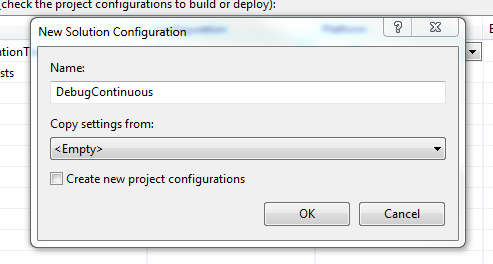
  3. Enter a configuration name, one that starts with "Debug". For this example, I have chosen DebugContinuous,
  4. From Copy settings from: dropdown, select Empty,
  5. Uncheck Create new project configurations if it is not already in an unchecked state

Figure 2, a minimal Debug continuous integration build configuration

Now may be a good time to create the Release profile as well. Same steps, simply create a profile with a name that starts with "Release" - if you're stuck, try ReleaseContinuous!

This naming requirement may seem odd, but we will be depending on MSBuild's ability to detect similar profiles based on name to target the correct mode for our solution. Basically, when our build environment invokes DebugContinuous, any projects that implement this mode exactly will build in DebugContinuous (more on this in a bit), and projects that do not will build in a mode that most closely resembles this mode (ie all of our existing projects). For our QA builds, this means Debug mode. When a suitable match cannot be found, MSBuild defaults to Release - so it is not the end of the world.

Adding Continuous Integration Project


Now that we have a (solution-wide) build profile for our continuous integration environment, we now need a place to throw in our unit test task. We could simply use any existing project, but for very large solutions, it makes better sense to consolidate our optional continuous integration tasks into a single place that is separate from our test code, so let's add a new project.

Add a new Class Library Project, Example.ContinuousIntegration. Delete the default Class.cs file.

All other projects are fine as they are, implementing only Debug and Release build modes. This one specific project however, will contain conditional elements that require the continuous build mode. So let's add our continuous build modes to Example.ContinuousIntegration. It is very similar to adding a solution-wide profile,
  1. Open ConfigurationManager,
  2. From Configuration dropdown beside our project, select New...,
  3. Enter your debug continuous integration build mode name. As with the rest of this example, I have used DebugContinuous,
  4. From Copy settings from: dropdown, select Empty,
  5. Uncheck Create new solution configurations if it is not already in an unchecked state
Figure 3, a minimal Debug continuous integration build configuration

Once we have defined our build modes, it pays to review each build configuration. Back in ConfigurationManager, iterate through each solution configuration. Ensure, that when Debug is active, Example.ContinuousIntegration does not build and is set to Debug configuration. Ensure that when DebugContinuous is active, all projects are in Debug mode and Example.ContinuousIntegration is set to build with DebugContinuous. Do likewise for Release modes.

One final check before we modify our project file directly.

  1. Open Project Dependencies,
  2. From Projects: dropdown, select Example.ContinuousIntegration,
  3. Check all project boxes,

Figure 4, add dependencies to continuous integration project to ensure a convenient build order


This creates an artificial dependency between our integration project and every other project in the solution. This ensures it builds last. While not strictly necessary, it makes it easier to debug build issues that we may encounter later on.

Now let's crack this sucker open. To edit this project through Visual Studio, first unload the project, and then edit it. Alternatively, use an external program (like Notepad.exe) to modify Example.ContinuousIntegration.csproj; when Visual Studio regains focus, it will detect modifications and prompt to reload.

When you first open it up, it should look something like this,


      Debug
    
    ...
  
  
    ...
  
  
    ...


    ...


What we will do next is add another build target that will contain our unit test execution task. To tidy up the declaration, we will also define some build properties and metadata. Our project file should now look a little something like this,

  
    bin\Debug\
  
  
    bin\Release\
  
  ...
  
    "$(MSBuildProjectDirectory)\..\Resources\nunit-console.exe"


      $(MSBuildProjectDirectory)\..\Example.UnitTests\$(OutputPath)
    
    
      $(MSBuildProjectDirectory)\..\Example.IntegrationTests\$(OutputPath)


A few things to note,
  1. Inclusion of AdditionalTasks as part of DefaultTargets attribute,
  2. Modification of OutputPath property, from default bin\DebugContinuous to bin\Debug, and
  3. Conditional inclusion of Example.IntegrationTests for ReleaseContinuous only
The rest of it is fairly straightforward. And I'm knackered.


Resources

MSDN MSBuild Reference
MSDN MSBuild Exec Task Reference
MSDN MSBuild Reserved Property Reference
Kent Boogaart's Blog, fail early with full builds
Peter Provost's Blog, custom metadata
Kevin Dente's Blog, run all tests, fail on at least one error

Monday, April 25, 2011

Oi, oi, oi ...

Been awhile. A few months back I started working on some material for some logging-based posts, but got side tracked by work and other stuff too. Still on the radar, but also ramping up on some Silverlight - especially the design aspects!

While searching for Silverlight related tutorials and sites, found this gem .toolbox. It's a clever site with loads of content that I am slowly working through. As a dev, the Expression Blend tutorials are a good way to get familiar with the product. I am especially interested in using Blend to prototype faster so that I may elicit users feedback sooner. I am also enjoying myself with the design sessions, and recommend these to any developer interested in User Interface design work.

.toolbox user avatar for johnny_g


Wednesday, October 13, 2010

I <3 palindromes ...

w00t! Stack Overflow!


Okay, so maybe not so unique, but pretty cool nonetheless!

Monday, September 27, 2010

Unit testing, how do I mock a signature with ref or out?

So, recently I had the distinct pleasure of mocking a service with method members that contained ref parameters. I thought this rather odd (I have never been a fan of 'in-place' modifications or returns), but not particularly special. That is, not until I came to unit test consumers of the service.

// immutable third-party service interface
public interface ISubmitMessage
{
    // ugly method
    void Submit (string username, string password, ref byte[] message);
}

// our poor poor consumer that has to interface
// with big bad mean service above
public class SubmitAdapter
{
    void Process (ISubmitMessage service)
    {
         // 1. set username and password from configuration
         string username = string.Empty;
         string password = string.Empty;

         // 2. generate byte-encoding of a string message
         byte[] messageBytes = null;

         // 3. invoke service
         service.Submit (username, password, ref messageBytes);

         // 4. inspect messageBytes return value for
         // success\failure
    }
}

Depending on our mocking solution, ref and out method parameters may or may not be supported. From personal experience many mocking frameworks do not support ref and out parameters. My current mock solution of preference is Moq, and with Moq v4.0.10827 (beta) we cannot verify pass-in and pass-out parameters out-of-box.

[Test]
public void Test_Process ()
{
    Mock<ISubmitMessage> service = 
        new Mock<ISubmitMessage> (MockBehavior.Strict);

    string username = "some.username";
    string password = "some.password";
    byte[] messageIn = null;
    byte[] messageOut = new byte[] { 1 };

    // ideally, we would like something similar to this
    service.
        Setup (
        s => s.Submit (
        username,
        password,

        // where we inspect on way in, and define a return value
        ref It.IsRef<byte[]> (d => Equals (d, null)).Returns (messageOut)));

    SubmitAdapter adapter = new SubmitAdapter ();
    adapter.Process (service.Object);

    service.VerifyAll ();
}

Unfortunately, this feature set does not quite exist yet - though as we shall soon see, we do not necessarily need direct support.

The key to mocking ref and out method parameters is understanding our requirements as a consumer and our requirements as a producer - and while disjoint, they can be satisfied via transform. By example, our consumer expects a functional implementation of a specific interface,

public class SubmitMessageStub : ISubmitMessage
{
    public void Submit (string username, string password, ref byte[] message)
    {
        // ??? 
    }
}

our test method expects a contract we can mock,

// a mock-friendly "normalized" version of original interface
public interface ISubmitMessageMock
{
    // similar signature to source method ISubmitMessage.Submit,
    // note new response object,
    SubmitResponse Submit (string username, string password, byte[] message);

    // new response class, a super-set of data expected to be 
    // returned
    public class SubmitResponse
    {
        // contains return message value
        public byte[] Message { get; set; }
    }
}

Jumping back to our consumer, it is a relatively trivial matter to transform from original to mock interface

public class SubmitMessageStub : ISubmitMessage
{

    // simple constructor that accepts a mock-friendly implementation
    private readonly ISubmitMessageMock _mock = null;
    public SubmitMessageStub (ISubmitMessageMock mock)
    {
        _mock = mock;
    }

    public void Submit (string username, string password, ref byte[] message)
    {
        // NOTE: do NOT add any additional parameter checking
        // or verification. our responsibility is to perform a
        // transform and delegate, let expectation testing occur
        // in caller,

        // 1. transform to mock
        ISubmitMessageMock.SubmitResponse response = _mock.
            Submit (username, password, message);
        // 2. reverse-transform
        message = response.Message;
    }
}

Our test setup now looks like

[TestMethod]
public void Test_Process()
{
    Mock<ISubmitMessageMock> serviceMock =
        new Mock<ISubmitMessageMock> (MockBehavior.Strict);

    // proper setup, you can do this with Moq!
    string username = "some.username";
    string password = "some.password";
    byte[] message = null;

    // we control out parameters here through internal
    // response object
    ISubmitMessageMock.SubmitResponse serviceMockResponse =
        new ISubmitMessageMock.SubmitResponse 
        {
            Message = new byte[] { 1, }, 
        };

    serviceMock.

        // we control in parameters here through standard
        // Moq inspection
        Setup (s => s.Submit (username, password, message)).
        Returns (serviceMockResponse);

    SubmitAdapter adapter = new SubmitAdapter ();

    // simply wrap mock-friendly version with our stub!
    adapter.Process (new SubmitMessageStub (serviceMock.Object));

    // and finally verify service interactions!
    serviceMock.VerifyAll ();
}

Wednesday, July 14, 2010

Unit testing, how do I unit test a Singleton?

Well, as with our WebService client sample, this question is a misnomer. More often than not we are interested in unit testing consumers of a Singleton than unit testing a Singleton's functional set - and depending on implementation, this may not be as straightforward as we think.

Consider

// a fairly typical Data Access Layer implementation (DAL). have actually
// encountered this on-site [shudders].
public static class DatabaseConnectionFactory
{
    public static IDbConnection GetDatabaseConnection ()
    {
        // 1. get connection string from config
        string connectionString = null;

        // 2. create connection
        SqlConnection connection = null;
        connection = new SqlConnection (connectionString);
        connection.Open ();

        // 3. some other custom stuff
        // 4. return connection
        return connection;
    }

    public static IDbCommand GetDatabaseCommand (
        string commandString,
        IDbConnection connection)
    {
        // 1. set custom stuff like transaction and timeout
        // 2. return command
        return new SqlCommand (commandString, connection);
    }
}

// embedded DAL logic in business tier - anyone else vomit in their 
// mouth just a little? - however what is especially offensive is the
// direct calls to data tier via static class DatabaseConnectionFactory
public class AppointmentBusinessObject
{
    public const string CommandString_LoadById_OneParameter = 
@"SELECT * 
FROM Appointments 
WHERE AppointmentId = {0}";

    public void LoadById (long appointmentId)
    {
        // 1. create Sql command string,
        string commandString = 
            string.Format (
            CommandString_LoadById_OneParameter,
            appointmentId);

        try
        {
            // 2. get connection,
            IDbConnection connection = 
                DatabaseConnectionFactory.
                GetDatabaseConnection ();

            // 3. get command,
            IDbCommand command = 
                DatabaseConnectionFactory.
                GetDatabaseCommand (commandString, connection);

            // 4. execute command
            Reader reader = command.ExecuteReader ();

            // 5. read contents
        }
        finally
        {
            // 6. close connection,
            if (connection != null) 
            {
                connection.Close ();
            }
        }

    }

}

Now, there are many reasons why this is a poor design, not the least of which is that we are locked into a single connection and a single implementation. We are forced to duplicate this source if any of these parameters need to change - and believe me this has happened!

If this were not reason enough to contemplate a complete revision, our ability to unit test is also impaired. Specifically, we cannot unit test or verify LoadById without hitting a datastore! In fact, we cannot unit test any class or method that invokes LoadById without hitting a datastore.

So what can we do?

Well the first thing to do is identify the actual problem - and here it appears to be a tight coupling between our business and data tiers. If we were to abstract DatabaseConnectionFactory then the result would be a loosely-coupled and more flexible system. To this end, I would suggest introducing an interface (that defines DatabaseConnectionFactory's existing members) and consuming this wherever possible.

For example,

// a simple data store interface, exposes full functional set
// of existing DatabaseConnectionFactory
public interface IDatabaseConnectionFactory
{
    IDbConnection GetDatabaseConnection ();
    IDbCommand GetDatabaseCommand (
        string commandString, 
        IDbConnection connection);
}

// we want this to be as low-impact as possible, so new
// interface defines members that already exist. sadly, 
// static classes cannot implement interfaces directly, 
// and so DatabaseConnectionFactory must be made an instance 
// class. while this requires a little deft maneuvering, 
// this may be accomplished with *zero* impact to existing 
// consumers! yay!
//
// 1. remove static key word from class declaration, this makes
// class instance-based
public class DatabaseConnectionFactory : IDbConnectionFactory
{

    // 2. remove static key word from members, this simply
    // makes existing method implementations instance-based
    public IDbConnection GetDatabaseConnection () { ... }
    public IDbCommand GetDatabaseCommand (
        string commandString,
        IDbConnection connection) { ... }

    // 3. define *new* static members that delegate to
    // instance-based members, this ensures that existing 
    // consumers do not break
    public static IDbConnection GetDatabaseConnection ()
    {
        // instantiate new factory every call for clarity,
        // potential optimization in declaring a static
        // lazy-loaded instance member, and delegating
        // to that instead
        DatabaseConnectionFactory factory = 
            new DatabaseConnectionFactory ();
        return factory.GetDatabaseConnection ();
    }
    public static IDbCommand GetDatabaseCommand (
        string commandString,
        IDbConnection connection) 
    {
        DatabaseConnectionFactory factory = 
            new DatabaseConnectionFactory ();
        return factory.GetDatabaseCommand (commandString, connection);
    }
}

// embedded DAL logic in business tier - vomitting just a little less -
// less offensive now we reference implementation-independent datastore
// definition
public class AppointmentBusinessObject
{
    // still tightly coupled to Sql-compliant datastore
    // but manageable.
    public const string CommandString_LoadById_OneParameter = 
@"SELECT * 
FROM Appointments 
WHERE AppointmentId = {0}";

    // 1. declare new factory member. this is our *dependency*
    // it *must* be fulfilled for class to operate successfully
    private readonly IDbConnectionFactory _factory = null;

    // 2. expose new parameter constructor, permitting consumers
    // of *this* class to specify an appropriate datastore
    public AppointmentBusinessObject (IDbConnectionFactory factory)
    {
        _factory = factory;
    }

    // 3. expose new parameterless constructor, this preserves
    // existing consumers who may not be "up to speed" regarding
    // this new-fangled connection specification. we also preserve
    // previous operating expectations by defaulting to ... 
    // "default" connection factory, so at worst, we deliver
    // *EXACTLY* same behaviour as before
    public AppointmentBusinessObject ()
        : this (new DatabaseConnectionFactory ())
    {
    }

    // 4. consume!
    public void LoadById (long appointmentId)
    {
        // ...
        try
        {
            IDbConnection connection = 
                _factory.GetDatabaseConnection ();
            IDbCommand command = 
                _factory.GetDatabaseCommand (commandString, connection);
            // ...
        }
        finally
        {
            // ...
        }
    }

}

So, where is the payoff exactly? Well, for one if we now wish to change datastore implementation (say to a MySql, or Oracle, or some other Sql-compliant datastore) we implement a new class and may swap between the two when desired. We also gain the ability to load objects from two or more datastores at the same time!

As a pleasant side-effect, we are also able to unit test LoadById directly, and any consumers that permit datastore specification.

// test business logic without hitting datastore! yay!
[TestMethod]
public void Test_LoadById ()
{
    IDbConnectionFactory mockFactory = null;
    // instantiate mock with expectations
    AppointmentBusinessObject appointment = 
        new AppointmentBusinessObject (mockFactory);
    appointment.LoadById (1024);
    // verify results
}

Friday, July 9, 2010

Unit testing, how do I unit test a WCF Service with dependency OperationContext?

Unit testing WCF Services is a lot like testing Web Services, especially in that they represent remote business logic. However, in some cases testing may not be straightforward, such as when referencing static framework class OperationContext,

// a simple subscription based service.
[ServiceContract (CallbackContract = typeof (ISubscriberCallback))]
public interface ISubscriptionService
{
    // push a subject to service
    [OperationContract]
    void Publish (string subject);

    // subscribe client to publications.
    [OperationContract]
    void Subscribe ();

    // unsubscribe client from publications.
    [OperationContract]
    void Unsubscribe ();
}

// a simple client-side subscription callback.
public interface ISubscriberCallback
{
    // push a subject to subscribers
    [OperationContract]
    void Receive (string subject);
}

// a possible implementation of subscription service
[ServiceBehavior (
    ConcurrencyMode = ConcurrencyMode.Multiple, 
    InstanceContextMode = InstanceContextMode.Single)]
public class SubscriptionService : ISubscriptionService
{

    private readonly object _syncRoot = new object ();
    private readonly List<ISubscriberCallback> _subscribers = 
        new List<ISubscriberCallback> ();

    public void Publish (string subject) { ... }

    public void Subscribe ()
    {
        // hm, static framework references ... 
        ISubscriberCallback subscriber = 
            OperationContext.
            Current.
            GetCallbackChannel<ISubscriberCallback> ();

        lock (_syncRoot)
        {
            if (!_subscribers.Contains (subscriber))
            {
                _subscribers.Add (subscriber);
            }
        }
    }

    public void Unsubscribe () { ... }

}

Unfortunately, if our service implements some sophisticated business logic while initializing callbacks then we risk either losing coverage with no tests or losing time and resources on elaborate environments to support our integration into WCF framework.

Well not to fear, this is strikingly familiar to our Web Service with Context dependency, and I would proscribe a similar solution. Namely,

// a simple abstraction to separate our business from 
// WCF framework. depending on our requirements, could be
// general for re-use elsewhere in our application code,
// or specific if this is a one-off use.
public interface IOperationContext
{
    // add methods as needed, for now we definitely
    // need access to our callbacks!
    CType GetCallbackChannel<CType> ();
}

// a simple wrapper implementation of operation context
public class OperationContextCurrent : IOperationContext
{
    public CType GetCallbackChannel<CType> ()
    {
        return OperationContext.
            Current.
            GetCallbackChannel<CType> ();
    }
}

[ServiceBehavior (
    ConcurrencyMode = ConcurrencyMode.Multiple, 
    InstanceContextMode = InstanceContextMode.Single)]
public class SubscriptionService : ISubscriptionService
{

    private readonly IOperationContext _context = null;
    private readonly object _syncRoot = new object ();
    private readonly List<ISubscriberCallback> _subscribers = 
        new List<ISubscriberCallback> ();

    // inject our dependency on operation context! this
    // decoupling actually makes sense - if we swap 
    // transport stacks we just require an implementation
    // that returns our requested callbacks!
    public SubscriptionService (IOperationContext context)
    {
        _context = context;
    }

    public void Subscribe ()
    {
        // ... ahhhh, that's much better!
        ISubscriberCallback subscriber = 
            _context.
            GetCallbackChannel<ISubscriberCallback> ();

        lock (_syncRoot)
        {
            if (!_subscribers.Contains (subscriber))
            {
                _subscribers.Add (subscriber);
            }
        }
    }

}

Now, if we were so inclined to test Subscribe above,

// test business logic without WCF! yay!
[TestMethod]
public void Test_Subscribe ()
{
    IOperationContext mockContext = null;
    // instantiate mock with expectations
    SubscriptionService service = new SubscriptionService (mockContext);
    service.Subscribe ();
    // verify results
}

Monday, July 5, 2010

Concurrency testing, viva CHESS!

A quick blip on the radar! I was just recently made aware of a (conceptually) awesome framework for exercising concurrent code. I have yet to employ CHESS myself but I am excited by its many promises.

Testing, types, kinds, and flavours

Building on anatomy of a test, I would like to follow up with a few points of note. These points are not based on any academic theory, principle, or practice. Instead, they are based mostly on anecdotal experience - so do not take this as "law", but rather a practical framework for communicating expectations about "testing" in general.

Preface aside, these points may be separated into three independent aspects,
  • Types,
  • Kinds, and
  • Environments,

Types

There are three main types of tests; unit tests, integration tests, and system tests. What differentiates one type of test from another is scope.

A unit test evaluates functional behaviour of a single component - all dependencies are stubbed or appropriately mocked. An integration test evaluates functional integration of two or more components - dependencies outside of a chosen scope are stubbed or mocked. A system test is a special case of an integration test, it evaluates functional behaviour of all components - no dependency is stubbed or mocked.

Kinds

Every test is carried out in one of two fashions, a test is either manual or automated. Admittedly, such a small set hardly warrants discussion, but it is important to recognize this distinction. Even if, as developers, we deal primarily in automated tests it may sometimes fall to us to provide a manual test plan for person-in-seat testers.

In terms of resources required, execution times, and result variance, manual tests may differ significantly from an automated equivalent. As such, it is important to understand these differences, and communicate appropriate expectations regarding the work required by that kind of test.

Environments

Last and not least is the environment in which a test executes. The shape of data used as input may impact veracity and performance* of a test, which is why it is important to implement and maintain different testing stages thoughout a development cycle.

The point and purpose of each stage is twofold. First, each distinct stage we implement should progress from development-ready quality to production-ready quality. Second, each stage isolates itself from the other - and we do not promote code if it does not pass muster.

As an example, we may have several development environments (one for each developer!), a single build environment, a Quality Assurance (QA) environment, a System Integration Test (SIT) environment, a User Acceptance Test (UAT) environment, and a Preproduction Test (PreProd or PPT) environment.

This is certainly not exhaustive, just some of the common stages I have seen in my work.

Perhaps we noticed that one environment is conspicuously absent? That would be Production (Prod). We do not typically test in Prod. In fact, never test in Prod. PreProd is an exact mirror, from hardware to data to security infrastructure. Furthermore, the only distinction between PreProd and Prod is that PreProd is not Prod. This speaks most importantly to the second point and purpose above, isolation. Heaven forbid anything goes wrong at this stage, but if it does then Prod is safe and we dodge the million dollar liability suit/bullet.

Further reading

Wikipedia on testing.


* = hm, some may be confused by my citing "performance" here. Generally speaking, performance testing is treated distinctly from functional testing and we do not mix the two. However, from a perspective of "testing", each sets expectations, invokes a process, and evaluates outcomes to expectations, and so performance is as valid a quality as a functional outcome in this context.

Thursday, May 13, 2010

Testing, anatomy of a test

Hm, just firing off a quick post here - the basic structure of a test
  1. Set expectations,
  2. Perform test and record actuals, and
  3. Evaluate actuals against expectations
Seems kind of trite and silly to state the obvious, but whenever I find myself in a bind it helps to take things back to basics.

Wednesday, April 7, 2010

Unit testing, how do I unit test WebService client X?

Another scenario I commonly encounter is the client side component to a WebService-based design.

For example,

// a client side view, displaying 
// server side profile data
public partial class ProfileView : UserControl
{
    private readonly Session _session = null;

    public ProfileViewModel ViewModel 
    {
        get { return (ProfileViewModel)(DataContext); }
        set { DataContext = value; } 
    }

    public ProfileView ()
    {
        InitializeComponent ();
    }

    // command implementation, fetches and assigns server side
    // data to client side data model
    public void Command_RefreshProfile ()
    {
        // embedded transmission codes! tsk tsk tsk
        // 
        // 1. get profile service
        ProfileWebService service = new ProfileWebService ();
        // 2. get profile
        Profile profile = service.GetProfile (_session);
        // 3. map to client side model
        ViewModel = new ProfileViewModel (profile);
    }
}

which is typical of a thick WPF client. Now, first thing to note is that the question
how do I unit test WebService client X?
is a bit of a misnomer. We are not actually interested in unit testing our WebService client, or in this case an instance of ProfileWebService. As with our WebService example what we really want to do is test our business logic and only our business logic.

Similarly then, the solution to this problem is to isolate our business from our remote invocation,

// a formal contract, defining all public operations 
// available for profile service
public class IProfileService
{
    Profile GetProfile (Session session);
}

public partial class ProfileView : UserControl
{
    private readonly Session _session = null;
    private readonly IProfileService _service = null;

    public ProfileViewModel ViewModel { get; set; }

    // we now pass in a reference to an implementation of our
    // profile service contract
    public ProfileView (IProfileService service)
    {
        InitializeComponent ();

        _service = service;
    }

    public void Command_RefreshProfile ()
    {
        // no embedded transmission codes! ah, nice clean code
        Profile profile = _service.GetProfile (_session);
        ViewModel = new ProfileViewModel (profile);
    }
}

When it comes to implementing IProfileService, we have one of two choices. If we are really lazy, and have access to the WebReference source,

// auto-generated web reference. except for these
// comments. and IProfileService definition below.
public partial class ProfileWebService : 
    System.Web.Services.Protocols.SoapHttpClientProtocol, 
    IProfileService
{
    // ...
}    

This has the advantage of no additional overhead or extraneous source files. The down-side is that maintenance is at a premium if the WebReference ever changes - which happens quite often in development. We must always remember to locate and modify the auto-generated classes with this interface definition!

Now, an alternative may be to automate the modification process, however that sounds like a lot of work to me. I would rather go the other route, and again, abstract the implementations a little.

Consider then,

// a thin wrapper for our auto-generated classes.
// has advantage of referencing most current web 
// reference when updated, without breaking existing 
// consumers
public class ProfileServiceProxy : IProfileService
{
    #region IProfileService Members

    // very simple pass through to actual auto-generated
    // implementation
    public Profile GetProfile (Session session)
    {
        // it is very important to keep this bit clean,
        // !!! NO BUSINESS LOGIC !!!
        ProfileWebService service = new ProfileWebService ();
        return service.GetProfile (session);
    }

    #endregion
}

Whichever route you go with, you have successfully isolated business from our remote service. This has the added advantage of being able to swap out ProfileServiceProxy with any implementation we like, say a WCF client, or a local instance of the actual service!

Our unit tests also benefit,

[TestMethod] 
public void Test_Command_RefreshProfile () 
{ 
    Session session = new Session ();

    IProfileService mockService = null;
    // instantiate mock with expectations 
    ProfileView view = new ProfileView (mockService); 
    view.Command_RefreshProfile (); 
    // verify results 
} 

Unit testing, how do I unit test WebService X with dependency Y?

Before moving on, I would like to build on our WebService example. In that example, we separated our business logic from our hosting solution. However, it may occur that our source solution has dependencies that must be fulfilled.

Consider this modified example,

// a profile web service, represents business logic 
// hosted from a web service
public class ProfileWebSevice : System.Web.Services.WebService
{

    // gets a profile for remote client
    [WebMethod]
    public Profile GetProfile (Session session)
    {
        Profile profile = null;

        // obtain authentication service from
        // web service context
        AuthenticationService auth = 
            (AuthenticationService)(Context.Cache["auth"]);

        // embedded business logic, bad bad bad
        // 
        // 1. authenticate
        if (auth.IsAuthenticated (session))
        {
            // 2. create sql connection
            // 3. get profile
            // 4. populate profile
            profile = new Profile (dataReader);
        }

        return profile;
    }

}

Note the dependency introduced by member variable Context. If we were to perform our simple refactor, we introduce compile-time issues,

public class ProfileService  
{ 
    public Profile GetProfile (Session session) 
    { 
        // COMPILE-ERROR: "Context" does not exist here! oh nos!!!
        AuthenticationService auth = 
            (AuthenticationService)(Context.Cache["auth"]);
        // ...
    } 
}

Fortunately, the solution is fairly straightforward. The key is realising our business logic of authenticate, fetch, instantiate is completely separate from the services that facilitate it. Our business class is a consumer of these services. From this perspective, it seems obvious to request these services as part of our invocation.

public class ProfileService  
{ 
    public Profile GetProfile (AuthenticationService auth, Session session) 
    {
        if (auth.IsAuthenticated (session)) { ... }
        // ...
    }
}

and our WebService now looks like

public class ProfileWebSevice : System.Web.Services.WebService
{
    [WebMethod]
    public Profile GetProfile (Session session)
    {
        AuthenticationService auth = 
            (AuthenticationService)(Context.Cache["auth"]);
        ProfileService service = new ProfileService ();
        Profile profile = service.GetProfile (auth, session);
        return profile;
    }
}

Again, our business logic does not care who or how a service is implemented, only that whomever is doing it, conforms to some known invocation. In this scenario, that an object instance of type AuthenticationService contains a method IsAuthenticated.

Our unit tests may look like

// test business logic without web service! yay! 
[TestMethod] 
public void Test_GetProfile_NullSession () 
{ 
    AuthenticationService auth = new AuthenticationService ();
    ProfileService service = new ProfileService (); 
    Profile actual = service.GetProfile (auth, null);
    // verify profile expectations
    // verify authentication service expectations
}

Thursday, April 1, 2010

I <3 unicorns ...

Happy April Fool's everyone! Loving the rainbow-y goodness of Stack Overflow's humour!


Friday, March 19, 2010

Unit testing, how do I unit test WebService X?

Most of this article appears in a StackOverflow post I submitted some time ago.

As the first bit of meat we cover in this series, we have a fairly typical scenario.
How do I unit test WebService X?
This scenario often presents itself as a WebService with embedded business logic within it.

For example

// a profile web service, represents business logic 
// hosted from a web service
public class ProfileWebSevice : System.Web.Services.WebService
{

    // gets a profile for remote client
    [WebMethod]
    public Profile GetProfile (Session session)
    {
        Profile profile = null;

        // embedded business logic, bad bad bad
        // 
        // 1. authenticate
        AuthenticationService auth = new AuthenticationService ();
        if (auth.IsAuthenticated (session))
        {
            // 2. create sql connection
            // 3. get profile
            // 4. populate profile
            profile = new Profile (dataReader);
        }

        return profile;
    }

}

I have worked on a number of web-based systems that employ this pattern, or something very similar. The four steps performed in sequence represent a very specific business flow, and it is not at all unreasonable to expect this flow to be tested.

Unfortunately, our example does not lend itself to testing very easily. For one, anyone reviewing this source would have difficulty separating our business from service hosting. While this distinction may seem trivial, it is often a source of great confusion. Do we need to host ProfileWebService? What about client-side proxies? Should we invoke from a web-client?

In short, the answer is no. WebProfileService and GetProfile represent parts of another tier altogether, that of web service hosting - and as far as testing is concerned, we are completely uninterested in testing [what is essentially] a third party hosting solution. Ultimately, we are interested in exercising our business logic and only our business logic.

What we really want is something like,

// a profile service without web service hosting,
public class ProfileService  
{ 

    // gets a profile
    public Profile GetProfile (Session session) 
    { 
        Profile profile = null;

        // 1. authenticate
        AuthenticationService auth = new AuthenticationService ();
        if (auth.IsAuthenticated (session))
        {
            // 2. create sql connection
            // 3. get profile
            // 4. populate profile
            profile = new Profile (dataReader);
        }

        return profile;
    } 
}

which is completely free of any web service tom-foolery. Our web service then looks like,

// this web service is now a consumer of a business class, 
// no embedded logic, so does not require direct testing 
public class ProfileWebSevice : System.Web.Services.WebService
{

    [WebMethod]
    public Profile GetProfile (Session session)
    {
        ProfileService service = new ProfileService ();
        Profile profile = service.GetProfile (session);
        return profile;
    }

}

Finally, to test our re-imagined service,

// test business logic without web service! yay! 
[TestMethod] 
public void Test_GetProfile_NullSession () 
{ 
    ProfileService service = new ProfileService (); 
    Profile actual = service.GetProfile (null);
    // verify results 
}

Making your WebMethods simple passthroughs to proper underlying business classes and removing logic from them completely, allows you to target "real" user code as opposed to the plumbing of your typical WebService implementation.

Code fragment

Hello all, just testing new code formatting

public class SomeClass : ISomeInterface
{

    public SomeClass ( ) { }

    // interfaces

    #region ISomeInterface Members

    public void SomeWork ()
    {
    }

    #endregion

}

Thursday, February 18, 2010

Unit testing, better design

Ahem, so before we dig into some code, I would like to take a minute and say something.

I can be a very stubborn and obstinate person, and I am also incredibly lazy! As such, even having attended many lectures and throwing thousands and thousands of dollars at some of the finest academia, I ignored many of the simple, basic, fundamental principles of Computing they tried to instill in me.

Principles like
  1. Interface programming,
  2. Encapsulation,
  3. Separation of Concern [SoC],
I am positive there are more, but these three form a triad of sorts, themes in my most recent adventures.

This sad state of ignorance was further compounded by youth, inexperience, and entering the "real world", where constraints prohibited my ability to exercise these principles.

Many, many, many years later, after much trial, error, and tribulation I have entered something of a personal [and professional!] renaissance. Rediscovering some of these principles, I am continually finding new ways to simplify, extend, and robustify [alright, that is not really a word, but whatever] my work.

If that were not enough, then may I also add: Applying these simple yet powerful principles facilitates unit testing! Yes! That is right! Not only will you produce better work, but you will be able to quantitatively and qualitatively prove it is better.

If you are not yet sold, I do ask that you continue reading. Certainly, for the attentive reader, you will see these three principles come up time and time again in the [real world!] examples I present.

As I have said, it has taken me a long time to come around and see this for myself. It is my hope here and now, that you benefit from my experience: When designing a functional component, think about how Interfaces, Encapsulation, and SoC can help you. Invariably, such considerations will lead to better design and better product.

Tuesday, November 3, 2009

Unit testing, an introduction

Browsing stack overflow the other day, I noticed quite a few questions regarding unit testing. I responded to a few such questions, but found I repeated myself a bit. I then took a look around, and found a lot of resources about testing frameworks and evangelicals in favour of the practice, but precious few conferring advice or guidance in the subject of "how to unit test well".

This has [somewhat] inspired me to write a series of articles about lessons I have learned and experiences I have had in my years as a developer - and hopefully these will help :)